
Marketing automation platform migration performs better when B2B enterprises audit data, integrations, and workflows before configuring the new platform. However, migration planning becomes post-launch troubleshooting when companies wait for the first contact to fail to sync.
Without understanding how to migrate a marketing automation platform, many B2B teams transfer their incomplete dataset to a new platform only to inherit data quality issues from the previous system.
More than platform capability, insufficient data preparation causes the migration to fail. Worldmetrics’ research finds that 40% of marketing automation migration programs failed due to poor data governance.
Many B2B enterprises rush to duplicate their old system into a new setup, and they miss the opportunity to reset the data quality standards. Organizations spending more time on data preparation during data migration will need less effort in post-migration fixes.
How to Prepare for Marketing Automation Migration, and What Must Be Audited Before Migrating
Current field structure, historical reporting data, integration dependencies, active workflow inventory, and contact database quality must be audited before finding an answer to how to migrate B2B marketing automation.
Many B2B teams replicate the current field structure in the new platforms, which can preserve old reporting problems. According to Gartner’s research cited by Medium, 83% of migration projects either exceed timelines and budget or fail.
B2B marketing automation migration offers enterprises a chance to simplify the data before rebuilding the model.
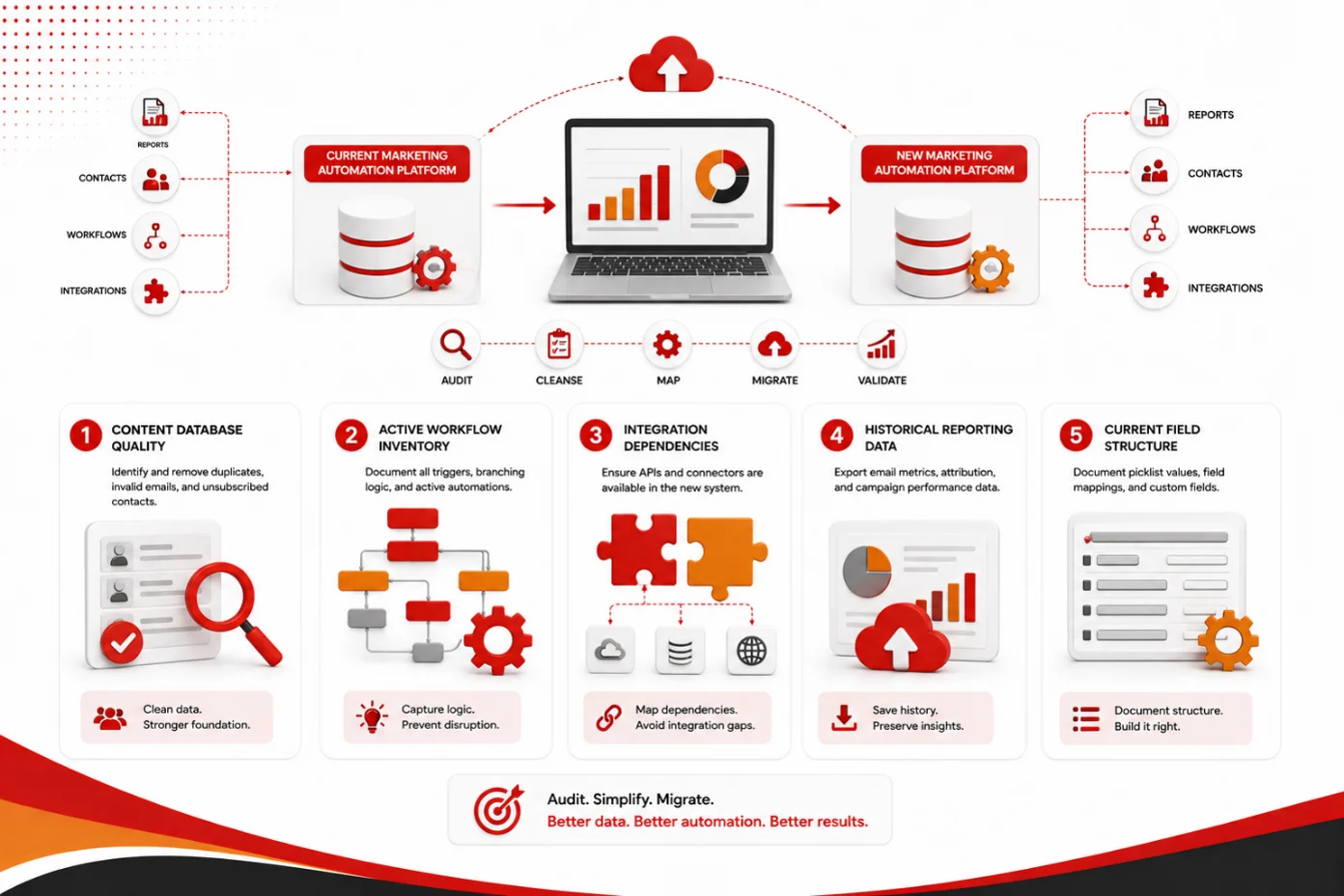
The following is the marketing automation migration checklist for B2B enterprises:
- Content Database Quality: Identify and eliminate duplicated records, invalid emails, and unsubscribed contacts using either HubSpot’s Duplicates Management Tool or Marketo’s Merge Leads function. This is how to migrate marketing automation data that adds commercial value to the new platform.
- Active Workflow Inventory: Document all trigger conditions, branching logic, and active automation, including MQL routing, alerts, and nurture programs. The old program built on logic that everyone has forgotten will not document itself.
- Integration Dependencies: Prepare a marketing automation platform migration checklist, and confirm that native connectors, APIs, or middleware in the new system support every required integration.
- Historical Reporting Data: Before decommissioning the old platform, export email metrics, attribution strategy, and campaign performance data because historical reporting data may not transfer cleanly between MAP platforms.
- Current Field Structure: Record and document each picklist value, field mapping convention, and custom field used in the current platform.
How to Migrate Marketing Automation Workflows and Map CRM Fields to a New Marketing Platform
Documenting each condition, trigger, and action in the existing system before building equivalent logic in the new platform answers how to migrate marketing automation workflows. Undocumented logic often gets rebuilt incorrectly from memory.
Many B2B enterprises simplify the process of marketing automation workflow migration by building fewer automations in new platforms. However, this initiative only adds value if the deleted automations did not produce measurable pipeline outcomes.
Rather than assuming the value that automation added, reviewing performance data before migration can be a solution to address this problem. The following steps ensure enterprises employ marketing automation field mapping best practices:
1. Field Mapping
Include three columns, namely old platform field, new platform field, and data type or format, in the field mapping document. After mapping all deals, contacts, or custom fields, flag fields that have no equivalent in the new platform.
2. Workflow Migration
Instead of simultaneously migrating all workflows, prioritize their commercial impact. While MQL routing and lead scoring may need early validation, nurture sequences and operational automations can follow once core revenue workflows are stable.
3. Reconfiguring Marketing Automation CRM Integration
Before migrating contact records, bidirectional CRM sync should be reconfigured and tested. A broken sync found after migrating several records might create a large reconciliation exercise. It is a more commercially important checkpoint, as sales and marketing functions depend on the same pipeline and customer data.
Summary: What Should a Marketing Automation Post-Migration Checklist Include to Confirm Operational Status
The marketing automation system migration checklist should check if lead scoring fires correctly, CRM sync is current and bidirectional, email deliverability does not deviate from the previous baseline, MQL routing reaches the right sales owner, and campaign tracking metrics correctly populate.
B2B teams can efficiently correct errors discovered in marketing automation software migration within the 72-hour window before they hamper meaningful leads or volume. The marketing automation migration process is operationally complete when key revenue operations work in production.
Marketboats can help you build a tailored marketing automation migration checklist for B2B environments around your CRM configuration, integrations, and existing platforms.
FAQs
1. Why migrate to a new marketing automation platform?
When the current platform produces scalability, operational, capability, cost, or integration problems, enterprises migrate. B2B teams also migrate when the existing architecture becomes difficult to manage.
2. What should be included in a marketing automation migration checklist?
CRM synchronization, field mapping, post-launch monitoring, integrations, campaign tracking, historical reporting, testing, data quality, deliverability, cutover, and workflow inventory are some important elements that an ideal migration checklist should include.
3. What data should be migrated to a new marketing automation platform?
Commercially useful data, including campaign, company, engagement, reporting data, contact, or consent, should be migrated, while historical data that may not transfer cleanly should be archived separately when future reporting or compliance needs require it.